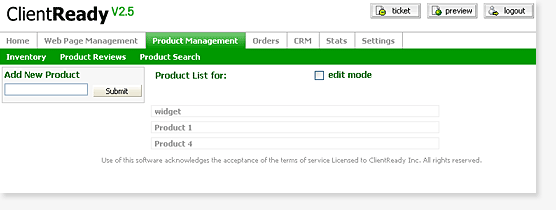
Adding a Product
Toll Free: 877.434.2096

Adding a Product
- Go to Product Management
- Find the category that you would like to add a product to
- Once you have found the Category that you would like to add products to, Click on that Category
- Look to your right hand column locate "Add New Product". If this is your first product then it will be below the "Add New Category", if this is not your first product in this particular category then it will apear on the top of the left column
- Once you have located the Text box enter the name of the product that you would like to add
- If you are unable to add the product make sure that the product name does not conflict with another product
- By default any product that you add will be inactive
- If you want to make it active click on the product name, then click on the "web" tab and choose the display checkbox and hit the submit button